
Once an access card has been hired and activated, tenants can gain access to their units 24 hours a day; the practical operation of smart access control systems for self-storage units depends on the system used at the facility. This article explains mobile booking, QR code operation, as well as smart cards, facial recognition and security arrangements.The table of contents covers access via access cards, CCTV and access control security, storage space estimation, and choosing an access method.
Key Points of the Article
- First, distinguish between booking arrangements and the actual credentials used to gain access, to avoid confusing different operational procedures.
- Understand the respective responsibilities of site surveillance and access management to grasp the division of labour in security arrangements.
- When organising items, draw up a list by category and quantity to ensure that space planning is better aligned with actual usage.
- Determine whether you require storage space or a separate workspace based on your primary use.
- When comparing access control methods, consider your own access habits and operational preferences.
How to Access Your Self-Storage Unit After Activating Your Access Card
Once you have completed the rental process and activated your access card, you may enter your rented storage unit in accordance with the facility’s access procedures. The access card serves as your authorisation for entry and exit. Before arriving, ensure you have your card and a list of items to be stored ready, so that you can organise your visits more efficiently.
The process can be broken down into several steps. First, complete the rental and activate your access card; upon arrival, follow the venue’s operational guidelines to gain entry and proceed to your unit. Once you have collected or stored your items, leave in accordance with the venue’s arrangements. Operational details may vary between venues; please refer to the on-site instructions when using the facility.
- Once you have completed the booking, confirm the unit you have reserved.
- Activate your access card as instructed, and ensure you bring it with you when visiting.
- Upon arrival, follow the access control instructions to enter the premises and proceed to your designated unit.
- Collect or store your belongings, and leave as instructed once you have finished.
Organising an inventory list before you set off will help minimise the time spent searching for items once you arrive. For example, if you need to retrieve documents and small electrical appliances during a renovation, you can list these two categories separately beforehand and then organise them according to the list. When changing your wardrobe for the season, you can also decide in advance which batch of clothes to retrieve and then arrange storage locations for other items.
The access card serves as your entry and exit credential, whilst the categorisation of your belongings is arranged by you according to your actual needs. Combining the two will make the purpose of your visit clearer. If you run an online shop, you can list the stock you need to retrieve by product category; if you are organising your home, you can record documents, clothes and furniture separately to minimise last-minute searching.
Please distinguish between ‘access cards activated’ and ‘mobile booking or QR code operations’. These involve different methods of use; do not assume that the booking screen or QR code can replace the access card.Once you have organised your storage unit, access credentials and the list of items for that visit, you will be able to complete the access process by following clear steps, making it easier to coordinate with removals, renovations or day-to-day storage arrangements.
CCTV and Access Control Security in Self-Storage Facilities
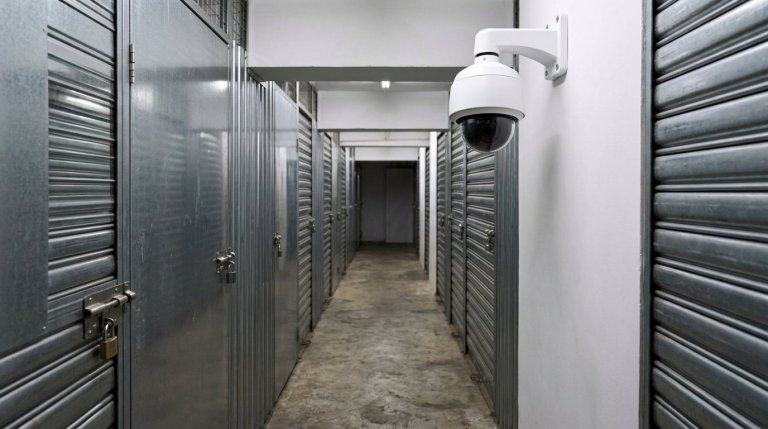
Security arrangements at self-storage facilities can be understood in two parts: CCTV surveillance and access control. The former involves monitoring the premises, whilst the latter manages access permissions.As their functions differ, the presence of CCTV should not be equated with each storage unit having an individual lock, nor should one infer the nature of on-site surveillance solely based on the use of access cards. Understanding the respective roles of each before renting will make it easier to grasp the actual access arrangements.
The key purpose of access control is to ensure that entry and exit are governed by tenants’ authorisation levels. Taking an activated access card as an example, tenants can follow the site’s operating procedures to gain entry and proceed to their rented unit. This arrangement differs from the purpose of CCTV: access cards are used for entry and exit, whilst CCTV is used to monitor the premises.Understanding this distinction helps avoid mistaking ‘self-service access’ for ‘all security functions being handled by access cards’.
CCTV surveillance provides an additional layer of security for the premises. It operates alongside access control, but the two cannot replace one another. For example, when a tenant visits the premises to collect items, the access control process handles entry to the premises, whilst CCTV forms part of the surveillance arrangements. These functions each serve a distinct purpose.Do not assume, simply because the term ‘smart security’ is used, that the system must necessarily include features such as real-time notifications, mobile viewing of footage or automatic alarms. These are distinct functions and should not be conflated.
You should assess your requirements based on your specific usage scenario. If you frequently access the premises outside office hours, first understand how access cards are used for entry and exit; if you are concerned about premises surveillance, you should distinguish between the roles of CCTV and the access control system.For example, an online shop tenant may need to arrange the collection and delivery of goods themselves, whilst a residential tenant might need to bring in furniture in batches during renovation work. Both scenarios involve access arrangements, but as the purpose of the items differs, the basic division of responsibilities within the security system remains the same.
When reviewing access control arrangements, pay attention to several specific aspects: whether the cards have been activated, the procedure to follow upon entry, and which access points the system covers.When examining CCTV arrangements, it is important to understand that this forms part of the site’s surveillance system; do not interpret surveillance as implying that someone is monitoring the premises in real time. Understanding these aspects separately allows for a more accurate grasp of the relationship between self-service access and site security, and prevents you from unconsciously adding functions that are not actually provided to your expectations.
Round-the-clock self-service access and security surveillance can coexist, but each addresses a different issue: access control specifies how tenants enter and exit, whilst CCTV indicates that the premises are under surveillance. If you are comparing self-storage units, first consider ‘access methods’ and ‘surveillance methods’ separately, then assess how they align with your access habits.This approach is suitable for situations such as moving furniture in and out during renovations, household organisation, or online retailers needing to access goods in batches. If you wish to find out about video retention periods, night-vision performance and acceptance testing, please refer to the section on CCTV video retention and night-vision arrangements for self-storage units.

How to estimate the storage space you need before renting
To estimate the space required in a self-storage unit, start by drawing up an inventory of your belongings. A size calculator can help you estimate the required area based on this list; recommended ranges start from one square foot up to 130 square feet or more.Rather than relying solely on a rough estimate of ‘how many boxes’, it is easier to get a sense of the space required by first organising your items by type and quantity, then reviewing the estimate. If you wish to learn more about the floor area of individual self-storage units and how to arrange your belongings, you should also take into account the ceiling height and access aisles.
Before you begin, make a detailed list of the items you plan to store. For a house move, you might categorise items into furniture, electrical appliances and cardboard boxes; for renovation storage, you could list mattresses, chairs and miscellaneous items that need to be temporarily moved out; whilst for an online shop, you could organise items by products, packaging boxes and spare stock.The more accurately your list reflects the actual contents to be stored, the more useful the calculator’s recommendations will be. If your belongings are still at home, it is advisable to sort them room by room to ensure you do not overlook items inside cupboards or under beds.
- List the names of the items, such as boxes of books, chairs or small electrical appliances.
- Note the quantity of each type of item; avoid simply writing ‘a batch of miscellaneous items’.
- Enter the list into the space calculator to view the recommended space requirements.
- Review the results to check whether the list has omitted any large items or additional boxes.
The list need not consist solely of large items. The number of cardboard boxes, folding chairs and small electrical appliances will also take up space; if you only list bed frames and sofas, your estimate may not cover the entire batch of items.Take moving house as an example: start by listing boxes of clothes, books, dining chairs and electrical appliances, then add any items you haven’t yet sorted. When compiling an inventory list for an online shop, record different products separately to avoid lumping together a batch of goods of varying sizes under a single entry.
When using the results, treat them as a starting point for your estimate rather than focusing solely on a single figure for floor area. The types and quantities of items you are storing, as well as whether you need to leave space for accessing them, will all influence how you organise the space.If you need to access items frequently, consider how to categorise and retrieve them when arranging storage; if you are primarily storing furniture that is not in use during renovation work, you may wish to separate the furniture from everyday items initially. These usage patterns will influence how you make the best use of the space required.
Once you have completed your estimate, cross-check the list against your actual needs. If you are likely to add items in the near future – for example, if your move is not yet complete or renovation materials will be stored in stages – include these anticipated items in your list; if you only need to store items that have already been organised, use your existing list as a guide.This will help you avoid making decisions based solely on the small number of items currently in front of you. By using your list as a starting point and combining it with the space recommendations from the calculator, you’ll be able to plan your self-storage space in a more organised manner.
Smart Cards, Facial Recognition and Access Control Options
When considering access control methods, it is helpful to first distinguish between standard features and technical options. The standard arrangement is that, once you have rented a self-storage unit and activated your access card, you can access your unit 24 hours a day.Facial recognition is another access control technology; do not assume that a facility will necessarily use it simply because you hear the term ‘smart access control’. Before making a comparison, confirm whether your priorities are access times, operating methods or identity verification.
The process for access cards is straightforward. Tenants first complete the rental, then activate their card, and upon arrival, follow the venue’s instructions for use. The card is a physical credential that must be carried at all times when entering or exiting. For those accustomed to using cards, this method is easy to understand; for example, when collecting documents from the storage unit after work, one simply needs to follow the established access procedure.If a card is lost or forgotten, the procedure for handling this will depend on the venue’s specific arrangements; you should not assume that alternative means of entry are available.
Facial recognition operates on a different principle. The system uses facial features for identity verification, whereas an access card relies on the physical card itself as proof of entry. The verification methods, usage procedures and data requirements for the two systems differ.If you are concerned about privacy or do not wish to use facial recognition, you may wish to take this into account when making your choice; if you prefer to carry one less item, you may also wish to enquire about the access control method actually used at the venue. These are different options; it does not mean that the same venue offers both.
- Access cards: Entry and exit are granted using an activated card.
- Facial recognition: A technology that identifies individuals based on facial features.
- Mobile booking or QR codes: These are distinct methods of operation and should not be directly equated with access cards or facial recognition.
When making your choice, consider each option carefully in the context of your specific usage scenario. If you frequently collect items at night, check the operating hours for self-service access; if multiple people need to take turns accessing the facility, clarify how each individual can obtain access rights.Those running online shops may be more concerned about the convenience of the collection process; domestic tenants, on the other hand, may place greater importance on how to unlock the access control system when they arrive. These requirements will help you compare the operational aspects rather than simply focusing on technical terms.
It is also important to distinguish between the terms ‘access control’ and ‘facial recognition’. The former indicates that the premises have access management in place, whilst the latter refers to a specific method of identification. CCTV surveillance is another security measure and is not the same as an access control function.Clarifying these concepts will help you understand what the access card is intended for and avoid mistaking technologies that are not in use for included services. Actual operations will still be subject to the procedures provided by the venue.
Finally, organise your priorities according to your own preferences: first, check whether the access times suit you; next, consider the access credentials and operational procedures; and finally, assess your comfort level with different identification methods.If you are researching smart access control systems for self-storage units, remember to compare the known access card arrangements separately from other technologies, such as facial recognition. This approach ensures your choice better aligns with your day-to-day needs and prevents you from making assumptions about functionality based solely on the term ‘smart’.
Lucky Storage’s Self-Storage Services
Lucky Storage offers self-storage units, mini-offices and a size calculator, allowing you to plan your space according to your home storage or work requirements before exploring the most suitable options.If you are comparing access control options, be sure to take into account your access habits, the types of items you wish to store and their intended use. Once tenants have rented a unit and activated their access card, they can access their storage unit 24 hours a day. The size calculator allows you to estimate the storage space required based on a list of items, helping you to make initial plans based on your specific needs.
When using the calculator, start by listing the items you intend to store—such as furniture, cardboard boxes, electrical appliances or online shop stock—and then refer to the list to view the recommended storage area. The calculator’s recommendations range from one square foot to over 130 square feet.This serves as a starting point for organising your needs, giving you a clearer picture of the types of items you need to store and the approximate space required. If your list does not include furniture being temporarily stored whilst your home is being refurbished, or goods that may still be added, add these items before recalculating; the result will be a more accurate estimate of your actual requirements.
If your needs extend beyond simply storing items and you are looking for a workspace, you may also wish to explore mini-office options.Information on mini-offices is available for San Po Kong, Kwun Tong, Tsuen Wan and Kwai Chung. Taking San Po Kong as an example, the indicative sizes range from approximately 100 to 1,100 square feet; in Kwun Tong, the indicative sizes include approximately 130, 200 and 400 square feet.Space requirements will vary depending on the nature of your work and your layout plans. Start-up teams, solo practitioners or small businesses should first identify their day-to-day operational needs before comparing these against the relevant information.
Before making a choice, you may wish to break your requirements down into several categories: do you need storage space or workspace? Is your inventory list complete? Will you need to access your belongings frequently on a daily basis? 24/7 self-service access via an access card is suitable for tenants who need to access their space according to their own schedule; a space calculator can help you estimate the area required for your belongings.By examining these requirements separately, it becomes easier to identify the type of space you need to explore next.
Starting with your inventory list, you can use the size calculator to organise your storage requirements; if your focus is on working space, you can review the location and size details of our mini-offices. These tools and space options will help you gradually transform vague storage or work requirements into a more concrete plan.If you’d like to find out more about space layout or access arrangements, please feel free to contact Lucky Storage for further enquiries tailored to your needs.
Plan your next steps based on your access habits
When organising your space, it’s worth considering how long your belongings will be stored for, at what times you’ll need to access them on a day-to-day basis, and whether you’ll also require a workspace. Once you’ve familiarised yourself with how the smart access system for mini-storage units works, you can then plan your next steps based on your actual needs, ensuring your choice aligns more closely with your daily routine.The Lucky Storage team is well-versed in the use of self-storage units, mini-offices and space calculators, and can help you clarify your requirements for storage or workspace.
If you’d like to explore space arrangements tailored to your needs, please feel free to contact Lucky Storage for further details. By clarifying your requirements first and then planning step by step, you’ll be able to free up suitable space for your home or work with greater ease.
Frequently Asked Questions
How do I use the mobile app, a password or a QR code to open the door of a self-storage unit with smart access control?
A mobile booking, PIN or QR code is not necessarily a valid access credential. Booking a visit and access authorisation are two separate matters; once a tenancy has been secured and the access card activated, tenants may enter and exit their unit 24 hours a day.When you arrive, please follow the access procedures provided on-site using your activated access card; do not assume that a booking confirmation or QR code will guarantee access.