
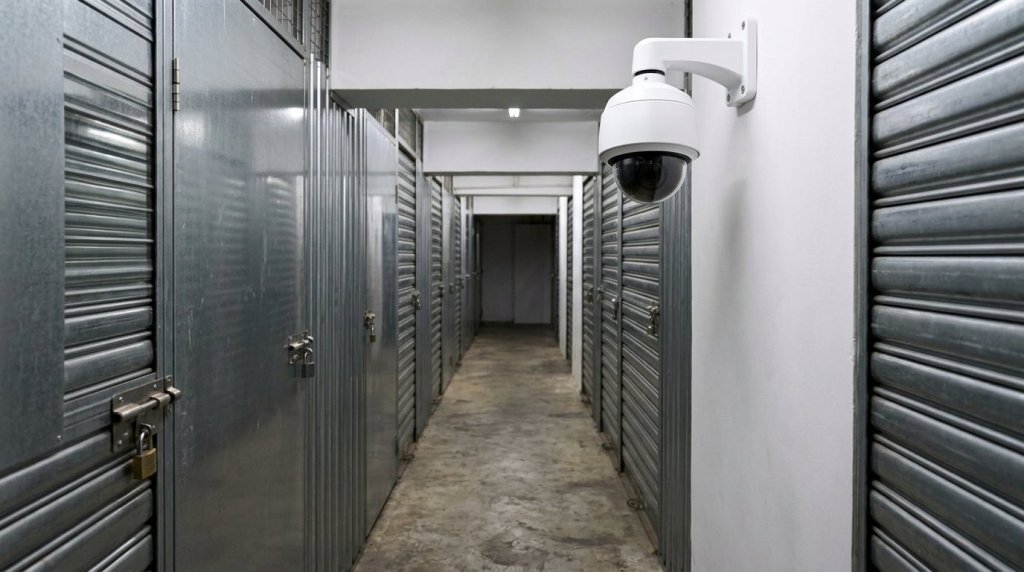
A 30-day retention period for CCTV footage is not a standard legal requirement for self-storage facilities in Hong Kong; the actual retention period depends on the number of cameras, the bitrate of the footage, the number of hours recorded each day and the storage capacity. Furthermore, night-vision footage from self-storage CCTV cameras may not be clear enough to distinguish labels or read text.If you are concerned about whether recordings are retained for a sufficiently long period, or what happens in the event of a power cut or internet outage, these are all points worth clarifying before renting.
This article explains how recording retention periods are calculated, the limitations of night-vision capabilities, and the impact of power cuts or internet outages on recordings; it also summarises the purposes of the cameras and practical points to note during installation and handover, enabling you to assess the security arrangements at a self-storage facility effectively.
Key points of the article
- Distinguish between the effects of power cuts and internet outages on recording and remote viewing, and understand that the two are not the same thing.
- Recording retention time is influenced by the number of cameras, bitrate, recording duration and storage capacity; it cannot be determined solely by the hard drive’s capacity.
- Night-vision footage is affected by lighting, reflections and the environment, and may not be clear enough to make out labels or small text.
- During handover, test the video feed, night-time performance, recording and playback under actual usage conditions to identify any blind spots or configuration issues at an early stage.
- Select wide-angle panoramic or tracking lenses according to site requirements, catering respectively to the need for overall coverage and the observation of specific areas.
Recording Arrangements During Power Cuts or Network Outages
Power cuts and network outages must be dealt with separately. A power cut will affect power-dependent cameras, DVRs and network equipment; a network outage, on the other hand, primarily affects network connectivity and remote viewing. If the DVR remains powered and is recording locally, an external network disconnection will not necessarily cause on-site recording to stop simultaneously.Before making arrangements, first ascertain which device receives the video feed, where the footage is stored, and the power source for each piece of equipment.
In the event of a power cut, first ascertain which devices will lose power simultaneously. The fact that a camera remains lit does not necessarily mean the DVR is still operational; nor does the continued operation of the DVR guarantee that the router remains connected. If a backup power supply is in place, you should list which devices it supports and how to verify that the system is operational once power is restored.The duration for which a backup power supply can sustain operations depends on the combination of equipment and power consumption; one should not assume that all operations will continue uninterrupted simply because a backup power supply is in place.
In the event of an internet outage, you should determine whether the external connection is down or whether the internal connections between devices within the facility are also affected. The former may render remote access temporarily unavailable; the latter may prevent the camera from transmitting footage to the recording equipment.The recording process can be diagrammed as a simple flowchart: CCTV cameras, connecting devices, recording host, and remote viewing terminal. By labelling the power supply and connection dependencies at each stage, it becomes easier to identify which links will fail in the event of a fault.
Two tests may be arranged during acceptance testing. First, verify the video feed and recording status whilst power is normal; then, simulate a network outage according to the established test procedure to check whether local equipment can still operate. Once connectivity is restored, confirm the status of the equipment and check whether the footage from the test period can be played back.Power failure tests should also involve observing each affected device individually, and confirming that the system restarts once power is restored. Appropriate on-site management should be arranged prior to testing to avoid disrupting normal access.
- Equipment records: List the power sources for cameras, video recorders and network equipment.
- Separate testing: Examine the status of each piece of equipment and the recording process separately during power cuts and network outages.
- Check recovery: Once power or connectivity has been restored, check the status of the equipment and review the test footage.
- Keep a record: Note the test time, affected equipment and inspection results for future comparison.
If any interruptions in the footage are detected, first note the start and end times, the affected locations and the status of the equipment at the time. Administrators should organise the data by the time period in which the incident occurred and retain the test records alongside the equipment status.The acceptance testing of self-storage facility CCTV systems should not merely confirm that footage is available during normal operation; it must also identify which functions remain available during interruptions and how to determine whether recording has resumed following restoration.
Night-vision functionality and video retention periods
Night-time imaging and recording retention are two distinct aspects to be checked.For night vision, assess the image quality in the actual environment; retention time should be estimated based on the volume of video data and available storage capacity. The illumination range of a self-storage facility’s night vision system does not guarantee that labels can be clearly identified or text read. If you are concerned about the intended use of footage from a specific location, you should view the night-time footage at that location before determining whether the level of detail is sufficient.
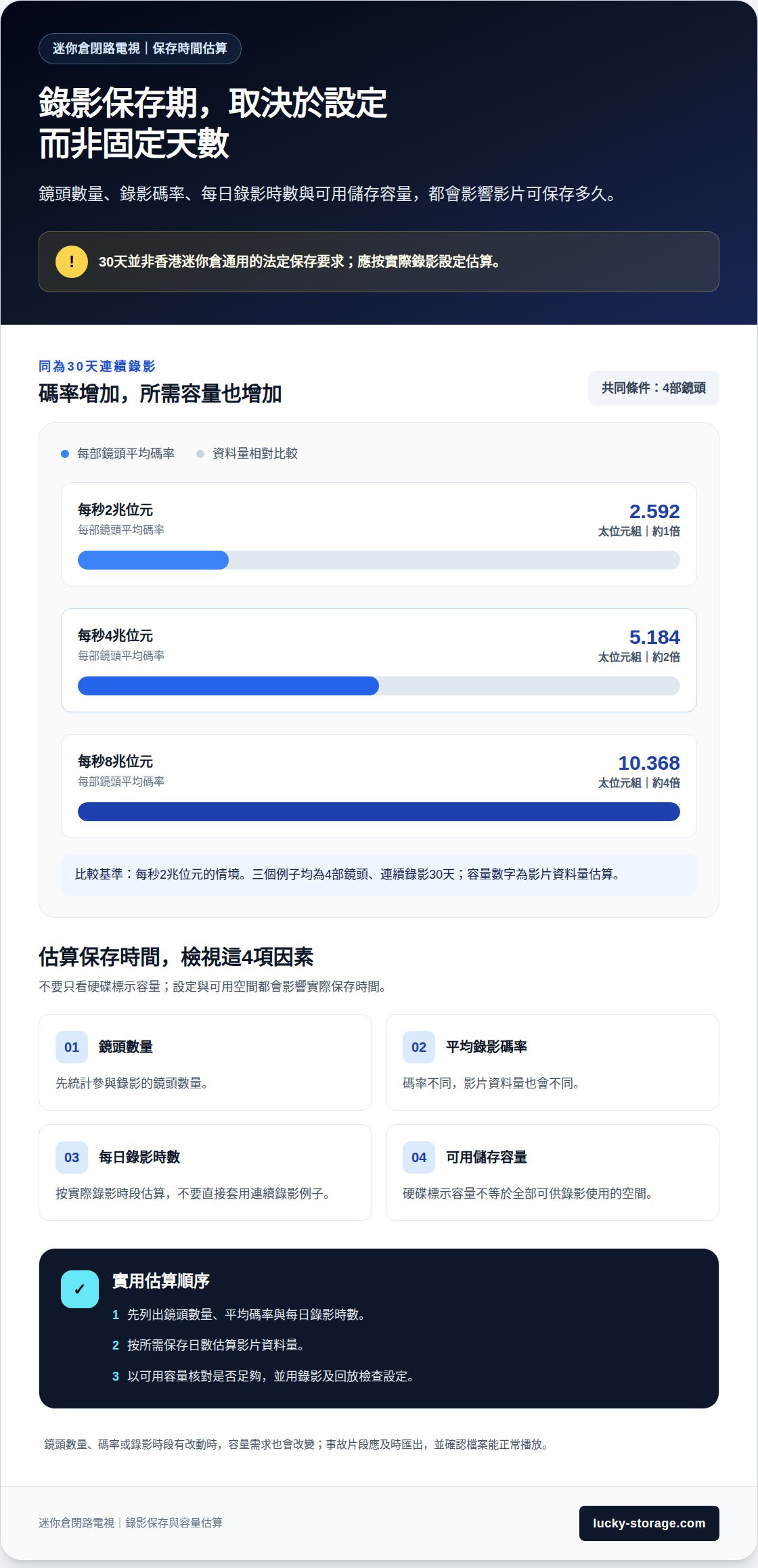
To calculate retention time, first list the number of cameras, the average bitrate per camera, the daily recording hours and the expected number of days of retention.The number of pixels alone does not determine storage requirements, as bitrate and recording duration also affect the volume of data. Based on four channels of continuous recording, with an average bitrate of 4 terabits per second per channel, recording for 30 days would require approximately 5.184 exabytes.
With the same number of cameras, different settings will result in significant variations in storage capacity. Four cameras, each with an average bitrate of 2 terabits per second, recording 24 hours a day for 30 consecutive days, would generate approximately 2.592 terabytes of video data.If the average bit rate per camera is 8 terabits per second, recording for the same 30 days would result in approximately 10.368 terabytes of data. Both examples are based on continuous recording and cannot be directly applied to systems using different recording schedules or settings.
The capacity stated on a hard disk drive does not equate to the total available space.The recording time that can be stored on a hard disk is affected by available space and video bitrate. This example can be used to understand the relationship between capacity and storage time; however, actual estimates still require the input of the number of on-site cameras, bitrate, recording hours and available space. You can first set the required number of days for storage, then work backwards to determine whether the capacity is sufficient.
The retention period should be set in accordance with the purpose of the recording and actual requirements.Thirty days is not a universal statutory retention period for CCTV applicable to all situations. If footage of an incident needs to be retained, the relevant clips should be exported promptly, and the date, time and camera location should be recorded to avoid difficulties in locating them later. After exporting, you should also confirm that the files play back correctly and organise them by incident to facilitate future searches.
- Calculate the number of cameras, the average bitrate and the daily recording duration.
- Estimate the data volume based on the anticipated retention period and calculate the required storage capacity accordingly.
- Review the actual footage at night; do not use the illumination range as a substitute for assessing image clarity.
- Set a retention period appropriate to the intended use; export incident footage promptly and verify that it plays correctly.
Once the estimate is complete, use test recordings and playback to verify that the settings meet expectations.If the recording mode, number of cameras or bitrate changes, storage capacity requirements will also change; therefore, storage arrangements should be reviewed after every adjustment. Only in this way can the intended use of night-time footage, recording settings and storage requirements be assessed separately, before being incorporated into the day-to-day management of the storage facility.
Night-time lighting, reflections and environmental constraints
Night-time footage is affected by on-site lighting conditions. Infrared night vision can illuminate darker areas, but the illumination range does not guarantee that labels will be legible. Take the small print on a cardboard box as an example: the box may be visible in the footage, but the text may be illegible.If the purpose is to check whether anyone is passing through an aisle, the requirements for the footage differ from those for identifying goods labels. First, determine what the camera is intended to monitor, then assess the night-time performance.
Reflections can cause局部 areas of the image to be overexposed. Glass doors, metal shelving and glossy packaging may all reflect the camera’s illumination. If the camera is positioned directly opposite a glass surface, the night-time image may even display glare, obscuring the passageway behind the door.During installation and testing, check the view through the camera for glass doors and shelving, and try adjusting the angle to avoid direct light falling on reflective surfaces. After repositioning the camera, be sure to review the original monitoring area again.
Shadows can also obscure details. Darker areas may form at corridor corners, at the base of shelving units, and behind tall cardboard boxes. If the positioning of goods changes, passageways that were previously clearly visible may become obscured by new boxes.Arrange the cardboard boxes according to how they are actually stored, then review the playback footage to check whether people are obstructed as they pass by. Simply viewing footage of an empty unit may not accurately reflect day-to-day usage.
Lighting conditions in the corridors, entrances and exits, and inside storage units at Hong Kong self-storage facilities may vary. The presence of lights at entrances and exits does not necessarily mean that the far end of a corridor or the area beside shelving units is equally well-lit. During testing, you should check each location individually rather than simply standing at the entrance viewing the live feed.If a camera is monitoring a passageway, ensure that it can still provide a continuous feed once pedestrians enter darker areas; if monitoring the interior of a storage unit, check whether boxes, door frames and shelving obstruct the view.
- Check the footage of entrances, corridor corners and areas next to shelving units at night.
- Check for reflections caused by glass, metal and glossy packaging.
- Arrange cardboard boxes in their usual storage configuration, then reconfirm any areas of obstruction.
- Determine whether the footage is intended for monitoring foot traffic or for identifying small text.
During acceptance testing, divide the tests into ‘lights on’ and ‘lights off’ scenarios, and review both live footage and recorded playback separately.If the same location appears dark, reflects light or is obscured during playback, adjust the camera angle or review the lighting arrangements, then retest. These practices enable you to assess the suitability of night-vision footage for real-world warehouse conditions, ensuring that ‘being able to make out outlines’ is not mistaken for ‘being able to see details clearly’.
Installation Location and Handover Acceptance Testing
Camera positions must be tailored to the monitoring objectives. Common features in Hong Kong self-storage facilities—such as main gates, floor access doors and unit doors—can be used to monitor entry through the main gate, movement between floors and access to individual units, respectively.Cameras at the main gate should clearly capture both entry and exit directions, whilst corridor cameras must cover corners and doorways. Footage from unit doors must avoid being obstructed by the door leaf itself. Cameras should not merely capture the door panel whilst failing to show the path taken by those entering or exiting.
When planning the layout, first inspect the line of sight along the actual routes taken by tenants. Move from the main gate to the floor and then to the unit doors, identifying obstructions caused by corners, pillars and shelving at each stage. For example, if a camera is aimed solely at the centre of the corridor, doorways adjacent to the wall may fall outside the frame.After adjusting the angles, re-check whether the entrances, exits and passageways remain within the field of view. Camera positions must also accommodate the daily movement patterns involved in opening doors and moving boxes.
Handover testing should be carried out on-site, item by item; it is not sufficient to simply view the live feed after installation. One person should pass through the main gate, the passageway door and the flat door in turn, whilst another checks whether each camera captures the relevant locations.Next, open and close the flat door to ensure the door leaf does not obstruct the view for extended periods. Finally, review the same sequence of movements via video playback to confirm that the recorded footage captures the continuous sequence of events, rather than merely showing that live monitoring functions correctly.
- Verify the footage: Check the main gate, floor corridors and unit doors one by one to ensure that the target locations are within the frame.
- Obstruction test: Open and close the doors in practice, and place cardboard boxes as you would in daily use to check whether door frames or goods obstruct the line of sight.
- Review the footage: After completing a single entry or exit, locate the relevant recording by time stamp and verify that the footage is continuous.
- Record blind spots: Note down any corners, door edges or passageways that are not visible, then adjust the camera angle and retest.
During acceptance testing, it is also important to distinguish between the purposes of the CCTV footage and the access control records. The camera provides live footage of the scene, whilst the access control system records access authorisation; the data from these two sources cannot be used interchangeably.If you need to investigate a specific entry or exit, first locate the relevant footage based on the entrance location and the time of the incident, then cross-reference it with the corresponding access control records. This makes it easier to determine whether the footage covers the actual route taken.
Finally, ensure that the handover documentation covers the camera positions, the coverage areas of each camera and playback procedures. If the shelving or storage arrangements within the warehouse change, the original field of view may be affected.After moving in large cardboard boxes, it is advisable to retrace the route from the main gate to the unit door to check for any new blind spots. The suitability of the installation depends not only on the number of cameras but also on whether actual entries and exits can be clearly recorded.
Differences in the Uses of Wide-Angle Panoramic and Tracking Lenses
Wide-angle panoramic cameras are designed to simultaneously capture a relatively large, fixed area, such as a corridor, an entrance or exit, or a row of unit doors. They are suitable for monitoring overall traffic flow, identifying the direction from which people enter and the locations they pass through.If a camera is mounted in the centre of a corridor, the field of view can cover the doorways on both sides; however, the wider the field of view, the smaller distant figures and details may appear in the frame. Any elements that need to be identified should be tested against the actual footage.
Tracking cameras serve a different purpose. When a moving object appears in the frame, the camera can swivel and follow that object, making it suitable for monitoring larger passageways or entrances and exits.Take the example of someone walking along a corridor: a tracking view can focus on their direction of movement; however, when the camera turns to one side, the doorway on the opposite side may no longer be centred in the frame. It prioritises tracking the target and does not necessarily provide a clear view of the entire warehouse area at the same time.
Before making a selection, list the primary surveillance tasks. If the focus is on determining whether anyone is passing through a particular section of a corridor, a wide-angle panoramic view is more convenient for capturing the overall scene.If you need to track a moving subject, a tracking camera is better suited to this type of observation. If you need to view both the panoramic view and a specific movement path from the same position, you should assess these two viewing requirements separately; do not assume that all areas can be clearly seen at the same time simply because the camera panes.
The field of view is also influenced by the layout of the premises. Corridor corners, pillars, door frames and tall shelving units may all obstruct part of the wide-angle view; similarly, after a tracking camera has panned, the original position may be temporarily out of view.Take, for example, a corridor with a flat-panel door around a corner: a single wide-angle view may struggle to cover both the inside and outside of the bend. The installation location and the purpose of the surveillance should be considered together.
- Assess the overall flow of movement: check whether the wide-angle view can cover both ends of the corridor and the doorways along the way.
- Check for moving targets: Test whether the tracking view can follow the route from the entrance to the flat door.
- Check for blind spots: Confirm which areas fall out of view at bends, around pillars or when the camera pans.
- Review the footage: Examine both the wide-angle and tracking footage separately to determine whether they meet practical requirements.
At the handover, arrange for someone to walk from the entrance to the end of the corridor, then review the footage from both camera types. Compare whether the footage retains the entire path of the pedestrian as they pass doorways; also note whether other entrances and exits remain visible after the tracking camera changes direction.This test allows you to make informed decisions based on the actual layout of the storage facility, rather than relying solely on camera names or live feeds. When selecting CCTV systems for self-storage units, first decide whether you require wide-angle or tracking coverage; this will make it easier to choose the most suitable surveillance solution.If you also require video recording for goods transport or everyday traffic, MUFU Technology Co., Ltd., which specialises in high-quality car and motorbike recording equipment, also offers a diverse range of professional video recording solutions for your consideration.
Lucky Storage
Lucky Storage can assist you in planning your storage space and estimating the required area based on your inventory list using our size calculator. Whether you are organising household items, preparing for renovations, or seeking workspace for a small team, you should first clarify the types of items, storage methods and usage requirements before deciding between a self-storage unit or a mini-office.
As for CCTV systems, aspects such as night vision, recording retention and camera positioning can be assessed item by item according to the testing criteria outlined in this article. Please feel free to contact Lucky Storage to explore your space planning options.
Frequently Asked Questions
What should I do if the recording time does not match the time of the incident?
First, check the time displayed on the player and compare it with the time of the incident you have noted. If the system clock is out of sync, searching directly by the time the incident occurred may cause you to miss the relevant footage. Once you have located the suspected footage, play a short section before and after it to confirm whether the movement of people or objects in the footage matches the sequence of events.
Is footage from a single camera sufficient to understand the entire sequence of events?
Not necessarily. A camera only captures the scene within its field of view. If the incident involves an entrance, corridor and flat door, you can view footage from the relevant locations based on the direction of movement, organising the sequence clip by clip. Recording the location and time of each clip will help prevent footage from different locations from being mixed up.
What should you do if the live feed is clear but the playback is not?
View the recorded footage directly and ensure you have selected the correct camera feed and time period. Live views and playback serve different purposes; you cannot rely solely on live views to judge the details of the recording. If the playback remains unclear, make a note of the blurred areas and the time periods in which they occur, as a basis for subsequently adjusting the recording settings or camera angles.


